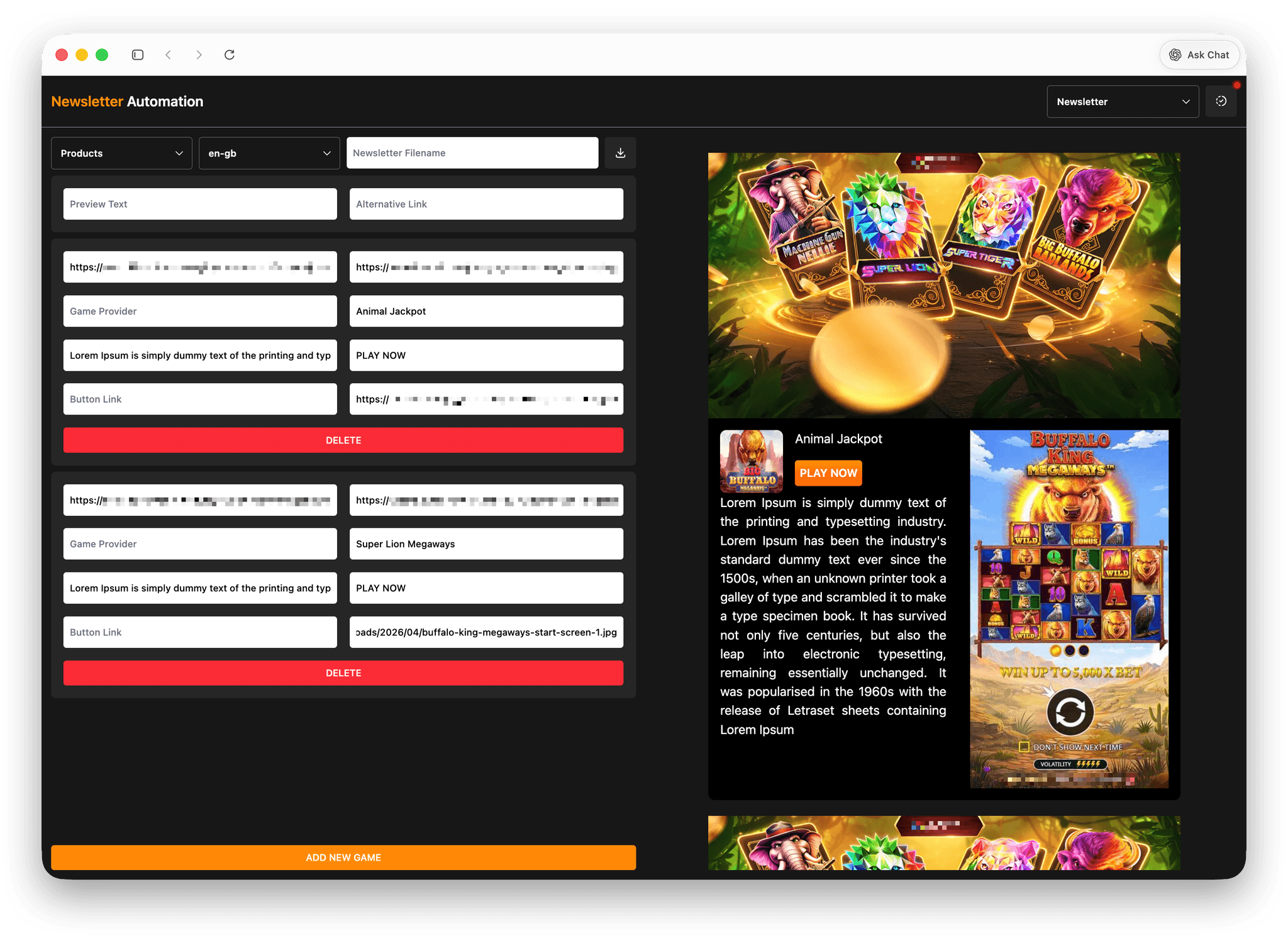
Case Study: Newsletter Builder
The Email Newsletter Builder is an internal tool that automates the creation of HTML email newsletters. It allows users to generate fully responsive, email-compatible templates by simply providing content and image links—eliminating the need to code from scratch.
I developed this as a full-stack solution using JavaScript and Tailwind CSS, focusing on producing consistent, reliable HTML optimized for various email clients.
Problem
Creating newsletter HTML files from scratch was time-consuming and inconsistent.
- Each request took 2–3 hours depending on requirements
- Designs varied across regions, leading to inconsistency
- Manual coding increased the risk of formatting and compatibility issues
- Required repeated testing for email client support
Solution
I developed a system that automates newsletter generation while enforcing consistency across all regions.
Key Features:
- Template presets for different campaign types
- Input-based generation (text + image links only)
- Outputs clean, email-compatible HTML (inline CSS)
- Email templates that supports light and dark mode
- Fully responsive email designs across devices
- Standardized code structure for easier debugging and testing
Process
Research & Collaboration
I worked closely with regional marketing teams and UI/UX designers to understand their requirements and align on a consistent newsletter structure. This helped ensure the generated templates met both branding and usability standards across different regions.
Technical Approach
- Designed a system that converts structured input (text + image links) into fully formatted HTML email templates
- Focused on inline CSS and table-based layouts to ensure compatibility across email clients
- Built reusable template presets to standardize layout and reduce manual work
Key Decisions
- Prioritized email compatibility over modern web practices, since email clients have strict rendering limitations
- Standardized output structure to make debugging easier during test blasts
- Kept the system simple and maintainable for internal use
Challenges
Implementing dark/light mode compatibility across email clients
Inconsistent rendering across devices and platforms
Email clients automatically inverting colors, affecting branding
Traditional CSS fixes (e.g., !important) not working reliably
Solutions
- Used gradient-based color techniques to prevent unwanted color inversion in dark mode
- Conducted repeated testing across multiple email clients to refine compatibility
- Optimized HTML structure specifically for email rendering constraints
Results & Impact
- Reduced build time from 2–3 hours → minutes
- Ensured consistent design across all regions
- Simplified testing and debugging process
- Actively used by the frontend/design team
Learnings
- Deep understanding of HTML email limitations and best practices
- Building truly responsive email layouts across clients
- Handling edge cases like automatic dark mode overrides
- Importance of consistency in scalable content systems