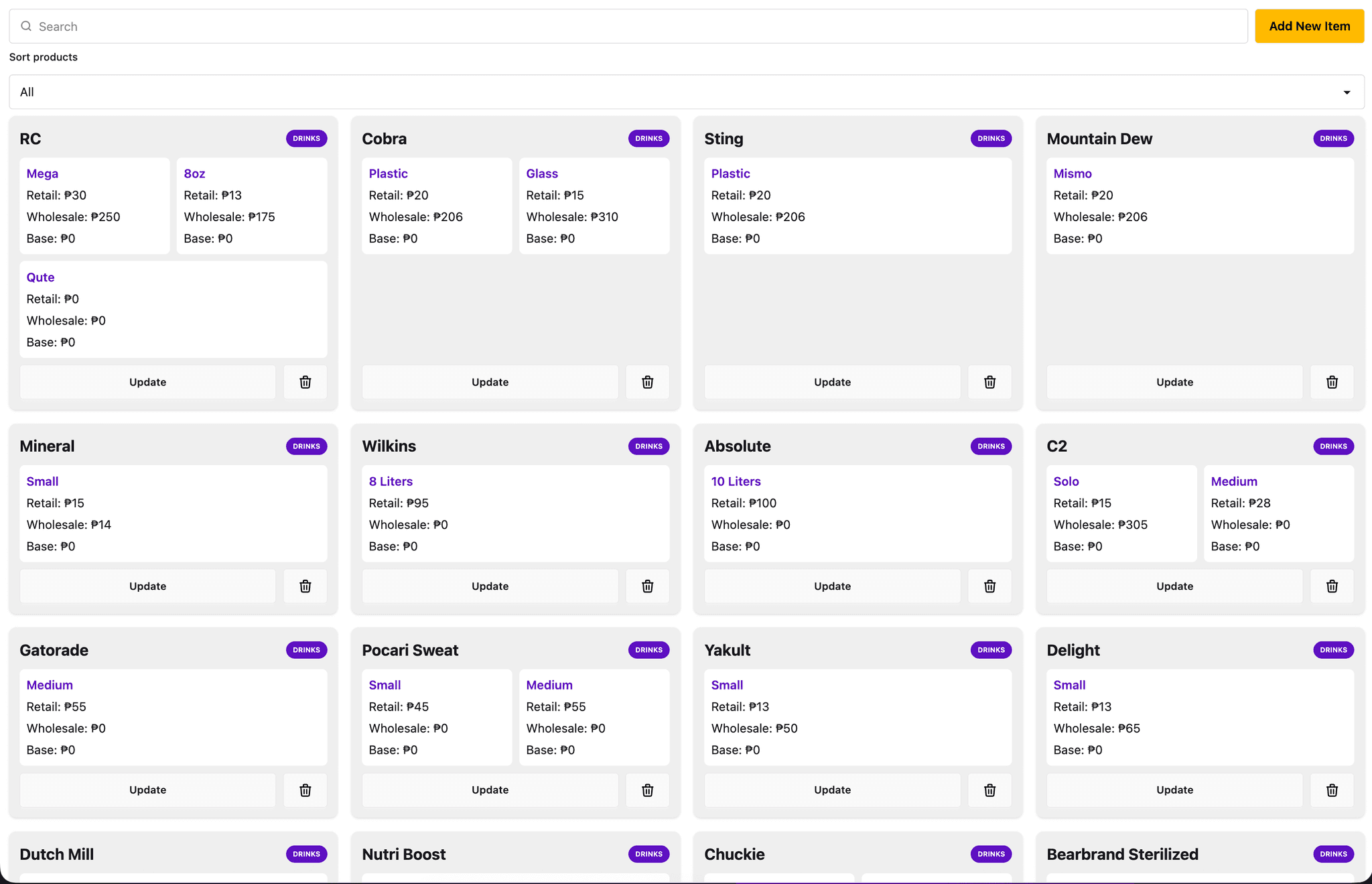
Case Study: Price Inventory System
The Price Inventory System is a web application designed to help small and medium store owners manage and track product pricing efficiently. It centralizes pricing information—including retail, wholesale, and investment costs—making it easier to update and retrieve accurate data as prices fluctuate.
I built this as a full-stack solo project using React, Node.js, Express, and MongoDB, focusing on simplicity, usability, and fast data access.
Problem
Managing product prices manually becomes difficult as inventory grows.
- Store owners often handle large numbers of products, making it hard to remember exact prices
- Prices frequently change due to inflation and supplier adjustments
- Lack of a centralized system leads to inconsistencies and errors
- Manual tracking (notes, memory, spreadsheets) becomes inefficient over time
Solution
I developed a centralized system that allows users to store, organize, and quickly retrieve product pricing information.
Key Features
- Full CRUD functionality for managing products
- Support for multiple price types (retail, wholesale, investment)
- Sorting and filtering for quick data access
- Clean and simple UI for fast input and retrieval
- Search functionality for faster product lookup
- Persistent storage using MongoDB
Process
Planning & Approach
I approached the project by focusing on real-world usability, keeping the interface simple enough for non-technical users while ensuring efficient data handling behind the scenes.
Technical Approach
- Built a REST API using Node.js and Express to handle product data
- Used MongoDB with Mongoose for flexible data modeling
- Structured product data to support multiple pricing fields per item
- Designed the frontend using React with Tailwind and DaisyUI for rapid UI development
Key Decisions
- Chose MongoDB for flexibility, allowing easy updates as pricing structures evolve
- Kept the UI minimal to prioritize speed and usability over complexity
- Implemented sorting and filtering to handle scalability as product lists grow
Challenges
Structuring data to support multiple pricing types per product
Maintaining performance when handling larger product lists
Designing a UI that stays simple while still being functional
Solutions
- Created a flexible schema to handle different pricing categories
- Implemented efficient sorting and filtering for better data navigation
- Focused on a clean UI layout to reduce cognitive load for users
Results & Outcome
- Provides a centralized source of truth for product pricing
- Reduces reliance on memory or scattered notes
- Improves accuracy and efficiency in day-to-day store operations
Learnings
- Strengthened understanding of full-stack CRUD systems
- Improved skills in API design and database structuring
- Learned how to balance simplicity and functionality in UI design
Future Improvements
- Implement price history tracking to monitor changes over time
- Add authentication and multi-user support
- Introduce export features (CSV/PDF) for reporting