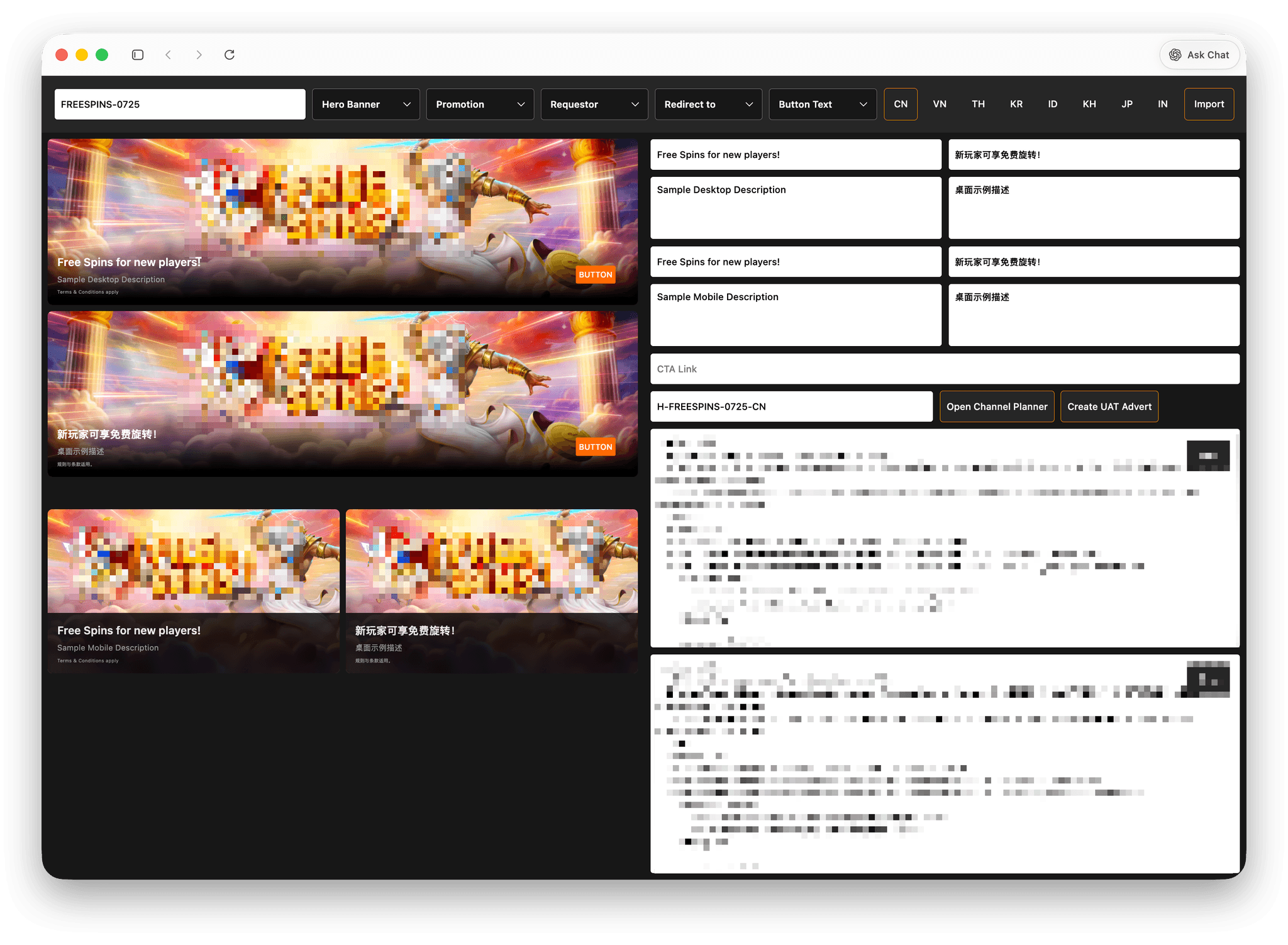
Case Study: Slice Code Generator
Slice Code Generator is a web-based internal tool that automates the generation of banner slice code for a Vue-based CMS. It enables users to instantly generate production-ready code by simply providing configuration inputs, eliminating repetitive manual coding.
I developed this as a full-stack solo project, focusing on speed, consistency, and usability for non-technical and semi-technical teams.
Problem
Creating banner slice code was a repetitive and error-prone process.
- Each request required manually writing Vue-based markup
- Web team had to handle multiple regions with duplicated structures
- Frequent errors in naming conventions, image paths, and formatting
- Non-technical teams depended on developers for small, repetitive tasks
- Slowed down delivery and increased risk of inconsistencies
Solution
I built a dynamic code generation tool that transforms user input into structured, production-ready Vue component code.
Key Features
- Dynamic code generation based on banner types (Hero, Overlay, Video, etc.)
- Multi-region support with automatic structure duplication
- Predefined templates aligned with CMS standards (e.g., SMediaBanner)
- Customizable inputs (titles, buttons, links, subtitles)
- Automatic image formatting for desktop and mobile
- One-click copy for faster deployment
Process
Research & Workflow Analysis
I started by analyzing how slice codes were manually written—identifying repetitive patterns, common errors, and areas where automation could significantly reduce effort.
Technical Approach
- Abstracted banner structures into reusable templates
- Built a dynamic form UI using Tailwind for structured input handling
- Implemented a logic layer that maps inputs into Vue component code output
- Ensured generated code strictly follows CMS formatting requirements
Architecture Decisions
- Designed as a frontend-only generator for speed and simplicity
- Used template-based string generation instead of a database
- Structured templates modularly to support scalability across banner types
Why This Stack
- JavaScript + Tailwind for rapid development and clean UI
- Vue-based output to match CMS requirements
- Avoided backend complexity since the tool doesn’t require data persistence
Challenges
Handling multiple banner variations without creating messy logic
Managing dynamic inputs across regions while keeping output consistent
Avoiding hardcoded values while meeting strict CMS formatting rules
Keeping the UI simple despite multiple configurable options
Solutions
- Broke templates into smaller reusable components instead of large strings
- Used conditional logic to handle variations cleanly
- Created helper functions for consistent formatting and naming
- Designed a guided UI flow to simplify user interaction
Results & Impact
- Reduced code generation time from minutes → seconds
- Minimized human errors in production code
- Standardized output across multiple regions
- Improved delivery speed for marketing and product teams
Learnings
- Designing tools that solve real workflow inefficiencies
- Structuring scalable dynamic code generation systems
- Balancing flexibility and simplicity in UI/UX
- Translating business requirements into practical engineering solutions